
Simple Search
The search tool operates intuitively like a search engine.
In simple search mode, the engine will search through all metadata for results that contain the query.
In the 3D view, by default, the results are displayed by isolating them from the other parts. They may appear as markers, with or without a ghost environment (semi-transparent), depending on the display options you selected in the search engine.
Advanced Search
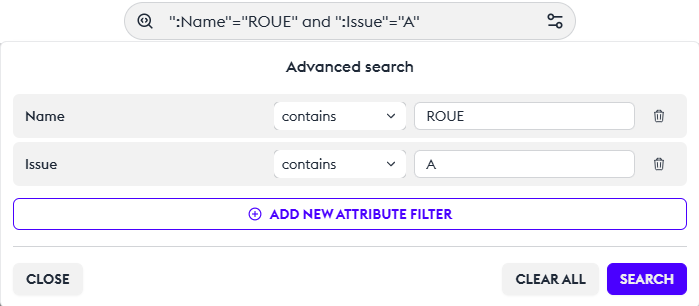
There is an advanced search editor for constructing complex and cross-referenced searches. You can configure your search editor according to your needs.
You can choose exact or contained results, and you can add filters by “issue,” “date” or any information from the metadata. Each search is saved in the history.
Apply This Search to the 3D Scene
If the cross-referenced search meets your needs, you can directly apply this selection by clicking on “Convert Search to Filter.” This will create an automatic filter on the active layer, instantly filtering your context.
Visibility of Parts
By default, the search only works on visible parts (as defined by the layers). Therefore, the search result might be empty, or you might not find your part. You have the option to override this limitation and perform a global search on all parts of the model using the option in the context menu “extend search to all mockup” An icon will indicate that this part is currently hidden.
Number of Recurring Results
The engine can indicate the number of parts that have the same name or the same metadata. If an object is duplicated in the model, you will know its exact number by looking at the dropdown menu.
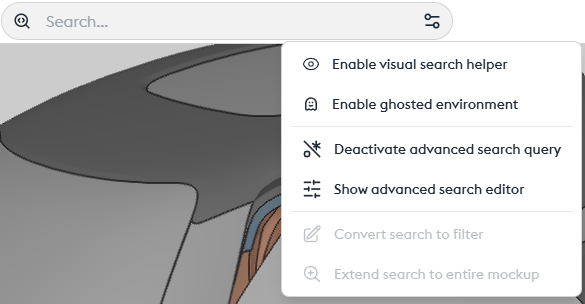
Different Options in the Context Menu
- Disable visual search aid: Removes the badges locating each object in the search.
- Disable ghost environment: Allows removing the ghost view (transparency). Parts included in the search will still be visible, but any other parts in transparency will be excluded from the view.
- Enable/Disable advanced search queries: Allows adding RegEx (regular expressions) queries. Reserved for advanced users.
- Show advanced search editor: Allows displaying the editor and compiling a cross-referenced/complex search without having to master regular expression syntax.